Dot Link - Connect the Dots
- 4.8
- Rating
- 10.00M
- Installs
- Free
- Price

 Analysis by App-foxy
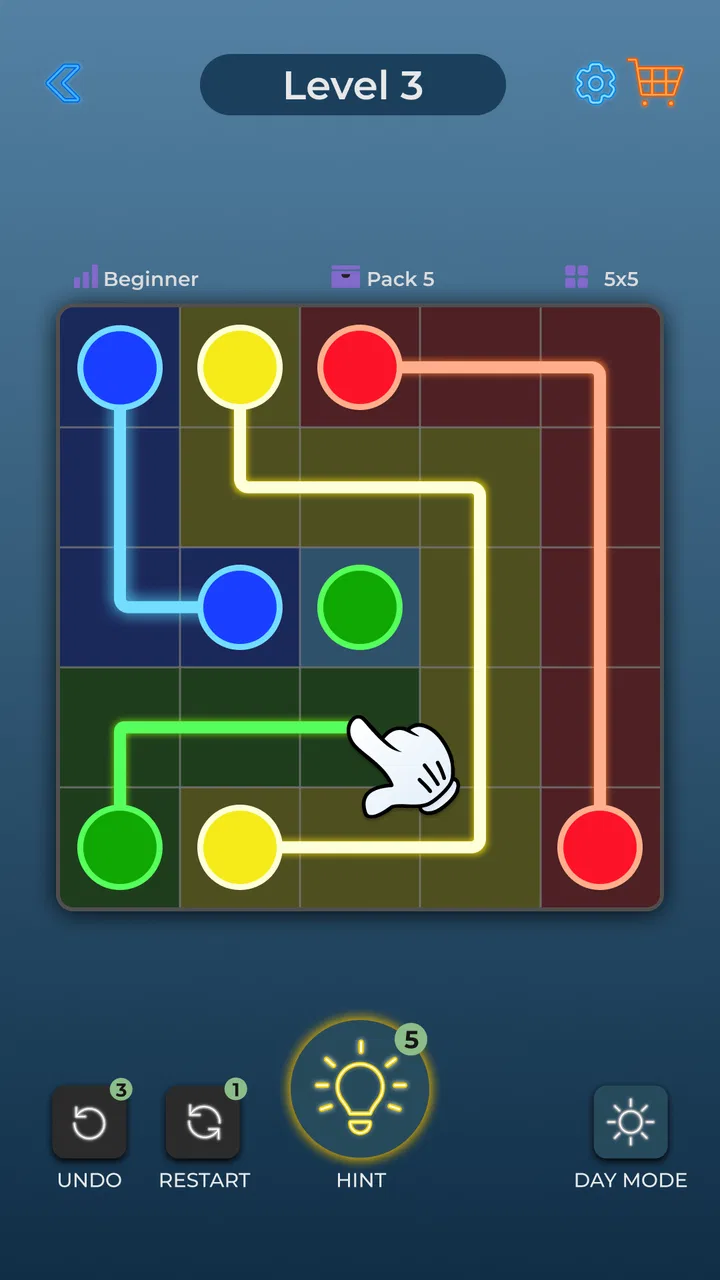
I like puzzle games that explain themselves in seconds but continue giving my brain something to chew on, and Dot Link - Connect the Dots fits that description well. The basic idea is familiar: I connect matching colored dots on a grid, but every connection has to work with the rest of the board. A line that looks correct can easily block another pair, so the real challenge is not simply spotting colors. It is planning the whole arrangement before committing to a move.
That makes this a comfortable game to pick up during a short break, while still offering enough spatial thinking to keep it from feeling like a disposable time filler. Bluetile has built it as a free puzzle game for everyone, and it is available for devices running Android 7.0 or later. The current version is 2.8.1, while the game itself first appeared on February 13, 2023. Those details matter mainly because they show that this is an established title rather than a brand-new experiment.
Its broad reception also suggests that the simple format has found an audience: Dot Link holds a 4.8 average from around 633 thousand ratings, with more than 10 million installs. I would not treat popularity as proof that every player will enjoy it, but it does match my experience of a polished, approachable game that is easy to understand without a tutorial-heavy opening.
You May Also Like

 Blood Strike: 2.5 Anniversary
Blood Strike’s Loadouts Turn Every Drop Into a Tactical Gamble
A close look at Blood Strike’s custom loadouts: how fast access to signature weapons reshapes its battle royale rhythm, rewards preparation, and narrows the gap between fights.

 Pandora - Music & Podcasts
Pandora’s Music Is Easy to Start, but Harder to Recover
Pandora’s strength is its low-effort path from a seed to a station. Its weak spot is how much confidence it asks you to place in connection, setup, and quiet recovery.

 8 Ball Pool
 Is Built on Rivalries, Rematches, and Routine
A close look at the rivalries, rematches, shared routines, and unanswered safety questions that turn a quick pool match into a persistent mobile community.

 Samsung Music
’s Quiet Strength Is Playing What You Already Own
Its reach comes less from spectacle than from dependable access to a personal library. That simplicity is both the app’s strongest retention engine and its ceiling.

 AccuWeather: Weather Radar
AccuWeather Review: A Quick, Clear Forecast for Everyday Decisions
For everyday plans, the best forecast is the one you can understand quickly. AccuWeather makes rain timing, radar, and local conditions easy to act on, with a few trade-offs.

 Hill Climb Racing
Why Hill Climb Racing Still Turns Crashes Into One More Run
A tiny car, a bumpy hill and one more upgrade: Hill Climb Racing keeps resurfacing because its simple chaos makes every near-miss feel personal.
More From Our News Desk



How the puzzle works in everyday play
Each board asks me to pair dots of the same color by drawing connections between them. The important restriction is that the paths need to coexist. I am not solving one color at a time in isolation; I am reserving space, checking corners, and deciding whether a short route now will make the final pair impossible later.
That structure gives the game its satisfying rhythm. At first, I look for obvious matches and edges that seem to allow only one sensible route. Then I examine the empty spaces left behind. When a board becomes crowded, the puzzle changes from quick matching into a small logic exercise, because one wrong assumption can force me to rethink several connections.
I found the best way to approach a difficult board is to avoid rushing toward the nearest matching dots. Instead, I first identify pairs with limited movement options. A pair tucked near a border or surrounded by other colors usually deserves attention before a pair with several possible routes. This is a useful habit because it reduces the chance of building a beautiful-looking path that leaves no room for the final connection.
Another practical technique is to treat open areas as valuable resources. A large empty section may appear available for any color, but using it too early can remove the only workable route for a more constrained pair. I often sketch the likely direction of the hardest connection mentally, then use the remaining space for flexible matches. That approach is more reliable than repeatedly dragging lines and hoping the board resolves itself.
Why the simplicity works
The controls are easy enough for someone who rarely plays games. There is no complicated inventory, character system, or story to learn before the puzzle begins. That makes it suitable for a quick session on a phone, especially when I want something calmer than an action game and more engaging than passive scrolling.
The simplicity also makes each mistake easy to understand. If a solution fails, I can usually trace the problem to a path I placed too early or an assumption I made about available space. That clarity is one of the game’s strongest qualities. It encourages me to improve my reasoning rather than blame unclear rules.
At the same time, the minimal concept may feel too narrow for players who need constant novelty. Someone looking for narrative progression, dramatic presentation, competitive multiplayer, or a large collection of unrelated mechanics should choose a different puzzle experience. Dot Link is focused, and that focus is both its appeal and its main limitation.
A useful game for short breaks
My favorite use case is a short waiting period: sitting on public transport, taking a coffee break, or winding down before bed. I can open the game, solve a few boards, and stop without losing track of a long storyline. The mental demand is adjustable too. An easier board can be a gentle warm-up, while a more awkward layout gives me a reason to slow down and concentrate.
It also works well for people who enjoy visual organization. I get a small sense of order from turning a cluttered grid into a set of clean, purposeful routes. That feeling is different from the reward of a word puzzle or a number puzzle. The challenge is spatial, so players who naturally think in shapes, routes, and boundaries may find the format especially comfortable.
For families, the Everyone content rating makes the game approachable across age groups. I would still recommend that younger players start with someone nearby if they become frustrated, not because the rules are difficult, but because the later reasoning can require patience. The game is easy to start; that does not mean every board is instantly easy to finish.
What the current version means for players
Version 2.8.1 is the build I would look for when installing today. I see that as a useful sign for existing players because the game is not sitting on its original launch version. A maintained version can make the experience feel more dependable over time, even when the core idea remains intentionally simple.
I would not expect the update number alone to transform the game. The central appeal still comes from connecting matching dots and managing the space between them. Players who liked the original concept should recognize the same kind of quick, visual reasoning rather than needing to relearn a completely different game.
That continuity is helpful for returning users. If I leave the game for a while and come back, I can understand what to do immediately. There is no need to remember a complicated progression system or reconstruct a story. The trade-off is that players hoping every update will introduce a radically new mode may find the evolution less dramatic than in larger puzzle games.
The game is free to install, which lowers the barrier to trying it. It does include optional in-app purchases ranging from $0.99 to $17.99 per item. I would keep that in mind before handing the phone to a child or treating the game as a completely cost-free experience. The free entry is attractive, but optional purchases mean it is worth checking device purchase settings if several people use the same account.
For me, the most important question is not whether the game costs anything to start, but whether the basic loop remains enjoyable without spending. Since the core activity is already clear and self-contained, I would try it normally first rather than buying anything immediately. If the puzzles themselves do not hold my attention, a purchase is unlikely to solve that problem.
How it compares with familiar puzzle alternatives
Compared with match-three games, Dot Link is slower and more deliberate. There is no need to chase cascading combinations or react to a timer-like sense of urgency. I can study the board and make a plan. That makes it a better choice when I want calm concentration, but a weaker choice when I am looking for spectacle, rapid rewards, or frequent visual effects.
Compared with word puzzles, it tests a different kind of thinking. I am not searching memory for vocabulary or interpreting clues; I am managing routes and available space. Players who become stuck on language-based games may appreciate that change, while people who prefer rich clues and multiple possible interpretations may find the boards too concrete.
Compared with classic Sudoku, the game is more visual and usually quicker to understand at the beginning. Sudoku rewards number placement and long chains of deduction, whereas Dot Link makes the geometry of the board immediately visible. I would choose Dot Link for a short session and Sudoku when I want a more sustained, notation-heavy challenge.
It also differs from free-drawing puzzle games because the goal is not simply to create any attractive pattern. Every color has to fit into the same limited space. That shared constraint gives the boards their tension and explains why an apparently simple connection can be strategically wrong.
Small habits that improve the experience
One habit I recommend is scanning the perimeter before the center. Border spaces often restrict how a path can turn, and identifying those limitations early can prevent a later dead end. I also try to notice pairs that are almost trapped by neighboring dots. They may not be the most visually obvious match, but they often determine the rest of the solution.
When I reach a board that seems impossible, I do not immediately redraw every line. I remove the connection that consumed the most open space and test a different route. This is more efficient than changing several paths at once because it tells me which assumption caused the blockage.
A third useful approach is to leave a mental “corridor” for the final difficult pair. I do not need to know the complete solution from the start, but I try not to fill every attractive gap. Preserving one broad route can be more valuable than completing another pair a few seconds earlier.
These habits also reveal the game’s main trade-off. The pleasure comes from thinking ahead, but that can become repetitive if I play for too long. I prefer several short sessions to one extended marathon. After too many similar boards, the visual pattern can start to blur, and the game loses some of its relaxing quality.
Where the experience still has limits
The focused design means there is limited room for players who want a strong sense of personal expression. I cannot turn the puzzle into a story-driven adventure or change the basic objective into something completely different. If variety is your top priority, a larger puzzle collection may offer more long-term stimulation.
There is also a difference between being accessible and being universally relaxing. Early boards may feel almost effortless, while later layouts can demand repeated attempts. That progression is reasonable for a logic game, but someone searching for a purely soothing activity may prefer a coloring app or a very gentle matching game instead.
The purchase range is another point to consider. Free installation is convenient, but the presence of optional items means I would not describe the entire experience as having no commercial friction. I would play without spending initially, review what I actually need, and avoid assuming that every available purchase improves the puzzle-solving itself.
Players who require offline certainty, extensive accessibility controls, or a particular set of competitive features should also check the experience on their own device before committing to it as a main game. I would not choose Dot Link for those needs based only on its central puzzle idea. I would choose it for the straightforward connection mechanic, quick access, and quiet spatial challenge.
Who should try it and what to expect next
I would recommend this game to anyone who enjoys tidy visual puzzles, prefers learning through play, and wants something that can fit into spare minutes. It is especially suitable for players who like solving problems without pressure and do not need a story or a large cast of characters to stay interested.
I would be more cautious about recommending it to someone who quickly tires of repeating one mechanic. The game’s strength is concentration around a single clear rule, so that same clarity may feel restrictive if you need constant changes in format. A word-game collection, Sudoku app, or action-oriented puzzle title would probably offer better variety in that case.
For existing users, the current version gives me no reason to expect a completely different game from the one they already know. The sensible expectation is continued access to the established dot-connecting format, not a promise of a new direction. I would watch future updates for meaningful improvements to board variety, solving comfort, and the balance between free play and optional purchases, while separating those hopes from what is available now.
My final impression is positive because Dot Link understands what makes a small puzzle satisfying. It gives me a clear objective, enough restriction to make each choice matter, and a format that works in the gaps of an ordinary day. The game is not trying to replace every other puzzle genre, and it should not be judged as though it were a story game or a competitive platform.
After spending time with it, I see Dot Link - Connect the Dots as a dependable choice for calm, spatial problem-solving. Its best feature is the way a simple pair-matching task becomes a lesson in planning. Its main weakness is the same narrow focus that makes it easy to enjoy. If that trade-off suits you, the free starting point makes trying it straightforward. If you need constant novelty or richer systems, you will probably be happier elsewhere.
Overall, I would keep it installed for short breaks rather than endless sessions. The game earns that place by respecting my time: I can understand a board quickly, think through a solution at my own pace, and leave when I am done. For a focused puzzle from Bluetile, that is a convincing result.
FAQs for Dot Link - Connect the Dots
01What is Dot Link - Connect the Dots about?
Dot Link - Connect the Dots is a puzzle game where players connect dots of the same color to create paths. The challenge increases with each level as players navigate through intricate patterns and obstacles. It's designed to enhance problem-solving skills and provides a relaxing yet engaging experience.
02Is Dot Link - Connect the Dots free to play?
Yes, Dot Link - Connect the Dots is free to download and play. However, it does include in-app purchases and ads. Players can opt to buy hints or special features to enhance gameplay, but these are optional and not necessary to enjoy the full experience.
03What devices are compatible with Dot Link - Connect the Dots?
Dot Link - Connect the Dots is available on both Android and iOS platforms. It requires Android version 5.0 or higher and iOS version 10.0 or later. The game is optimized for both smartphones and tablets, ensuring a seamless experience across devices.
04Are there any in-app purchases in Dot Link - Connect the Dots?
Yes, the game offers various in-app purchases. Players can buy additional hints, remove ads, or unlock special levels. These purchases are entirely optional and designed to enhance the gaming experience without impacting the core functionality of the game.
05How can I solve difficult levels in Dot Link - Connect the Dots?
If you encounter challenging levels, the game offers hints that can guide you through tough spots. Analyzing the puzzle carefully and planning your moves strategically can also help. Additionally, players can share experiences or seek advice from the active online community for tips and strategies.
Pros
- Intuitive interface that's easy to navigate.
- Wide variety of challenging puzzles available.
- Offline mode for gaming without internet.
- Vibrant graphics enhance user engagement.
- Regular updates with new levels and features.
Cons
- Ads can be intrusive during gameplay.
- Limited hints may frustrate some players.
- Some levels feel repetitively similar.
- In-app purchases can be costly.
- Initial load time is occasionally slow.

Dot Link - Connect the Dots
Gallery